 AgenticNFT.ai
Activate Agents
How to set up a Muse

The muse is already an ERC-8004 agent. Activation means you start using it, without replacing the assistant you already use.
Before you paste
- Leave Settings → Personalization alone. That is your default. Do not edit the global custom instructions, and do not clear memory.
- A chat follows one set of instructions. Pasting a muse into the main custom instructions makes that muse the voice for new chats.
- ChatGPT does not run two system prompts in one chat. You can keep many pets. You open one at a time.
- Make a separate place for the muse. Use a project, then one chat per muse. Do not paste every prompt into the project’s root instructions. Those prompts compete.
Set up one muse
- Confirm you hold it, or open a public muse page if you only want to read the voice. Holder-only actions, such as signing a Terrakin link, need the wallet that owns the NFT.
- Open the muse page:
https://musegod.org/muse/<id>. - Copy the prompt under “use this muse.”
- Create a project in ChatGPT, Grok, or Claude. Name it for the collection, for example “Musegod,” or for one muse, “Muse 42.”
- Keep the project instructions neutral if you may add another muse. Do not paste the prompt there.
- Open a new chat inside that project. Paste the prompt at the start of the chat.
- Ask the pet to introduce itself in its soul’s voice.
After that, the muse is “on” whenever you open that chat. Close the project and your normal AI is back.
What you keep. Global custom instructions, memory outside that project, and your other projects.
What you do not get. The chat log does not write itself back to the NFT. The muse does not automatically post, trade, or spend. One chat still has one voice.
More than one muse
Create one project, then a new chat for each muse. Name the chat with the muse’s name, number, and role.
- Create a Project. Name it “Agentic Agents - Musegods,” or another name you will recognize.
- Keep the project instructions neutral. A setup chat, such as “Musegod Agent Setup,” can hold the shared rules. A muse persona turns on only in that muse’s own chat.
- Inside the project, create a new chat for each muse.
- Name the chat with the muse’s name, number, and role.
- Paste that muse’s activation prompt into its own chat, not into the project instructions.
One chat per muse, named for its role. Paste that muse’s prompt at the start of its chat.
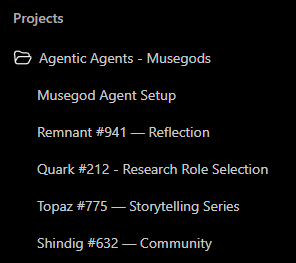
Those chats may still share project context. If you want each muse’s information and memory separated, use a separate project for each muse, not only a separate chat.
A custom GPT, or Claude
- Custom GPT. If your plan allows it, you can make a GPT instead of a project. That GPT is a second assistant. Your default GPT stays. Projects and custom GPTs are separate instruction boxes. Starting one does not delete the other. You still only talk to one of them in a given chat.
- Claude, one muse. Make a new Project and paste that one prompt into the project’s instructions. Leave your other projects as they were.
- Claude, several muses. Keep the project instructions neutral and paste each prompt into its own chat, the same way as ChatGPT.
Optional next steps
- Point a builder agent at
https://musegod.org/muse/<id>.txtor the.jsonfile. That is the same prompt, without the copy step. - On the muse page, sign with the holder wallet to name a Terrakin profile.
- Join the flock at flock.musegod.org if you want the muse to answer the daily call. Writing the answer in chat does not submit it.
Source. Musegod docs, “Your muse as your agent.”
Back to the Musegod pet notes · Loopers Initialization · Back to Deploying Agents